

Regional Settings
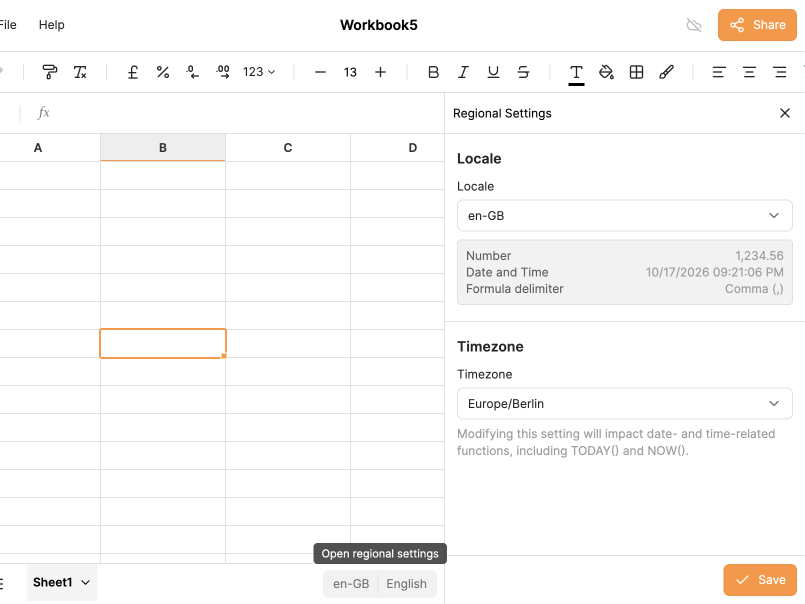
The Regional Settings allow you to change the locale and timezone for your workbook.
About Locale, Timezone and Language
Locales and timezones are a workbook property. If you create a new workbook, it will use the default locale and timezone, not those of your previous workbook.
IronCalc allows you to have a different display language for the engine (formulas) than your locale. This means your locale might be it-IT but your formulas will still be in English. The language is not a property of the workbook. Two people can be looking at the same workbook in different languages. This has some profound consequences. For instance the formulas INFO and CELL always take their parameters in English independently of the language.
How to Change the Locale
- Click on the locale indicator in the bottom-right corner of the canvas.
- A drawer will open on the right side.
- Select the locale for your workbook.
- This will affect how numbers, dates, and times are displayed. For instance, the number
1,234.56in en-GB will appear as1.234,56in es-ES.
- This will affect how numbers, dates, and times are displayed. For instance, the number
How to Change the Timezone
By default, IronCalc uses your browser's timezone. This can be changed from the Regional Settings drawer.
Changing the timezone will affect date- and time-related functions, such as TODAY() and NOW().