

Language Selector
IronCalc can be used in multiple languages. Switching the language affects not only the interface, but also the engine—formulas and error messages will use the selected language.
Currently, only English, Spanish, French, German, and Italian are supported. If you'd like us to add a specific language, let us know on Discord or start a Discussion in our GitHub repository.
How Languages Work in IronCalc
IronCalc will try to match your browser's language and locale when possible. If your language is not supported, it will default to English (en-US).
If you change the language, this preference is stored in your browser's local storage, so every time you access IronCalc, your setting will be remembered.
Switching the language affects all workbooks, updating both the interface and engine language. The locale will also change, unless it has been manually set for a specific workbook.
How to Change the Language
- In the top-left corner, click on File.
- In the menu that opens, hover over Default Language.
- Click on the language you want to use.
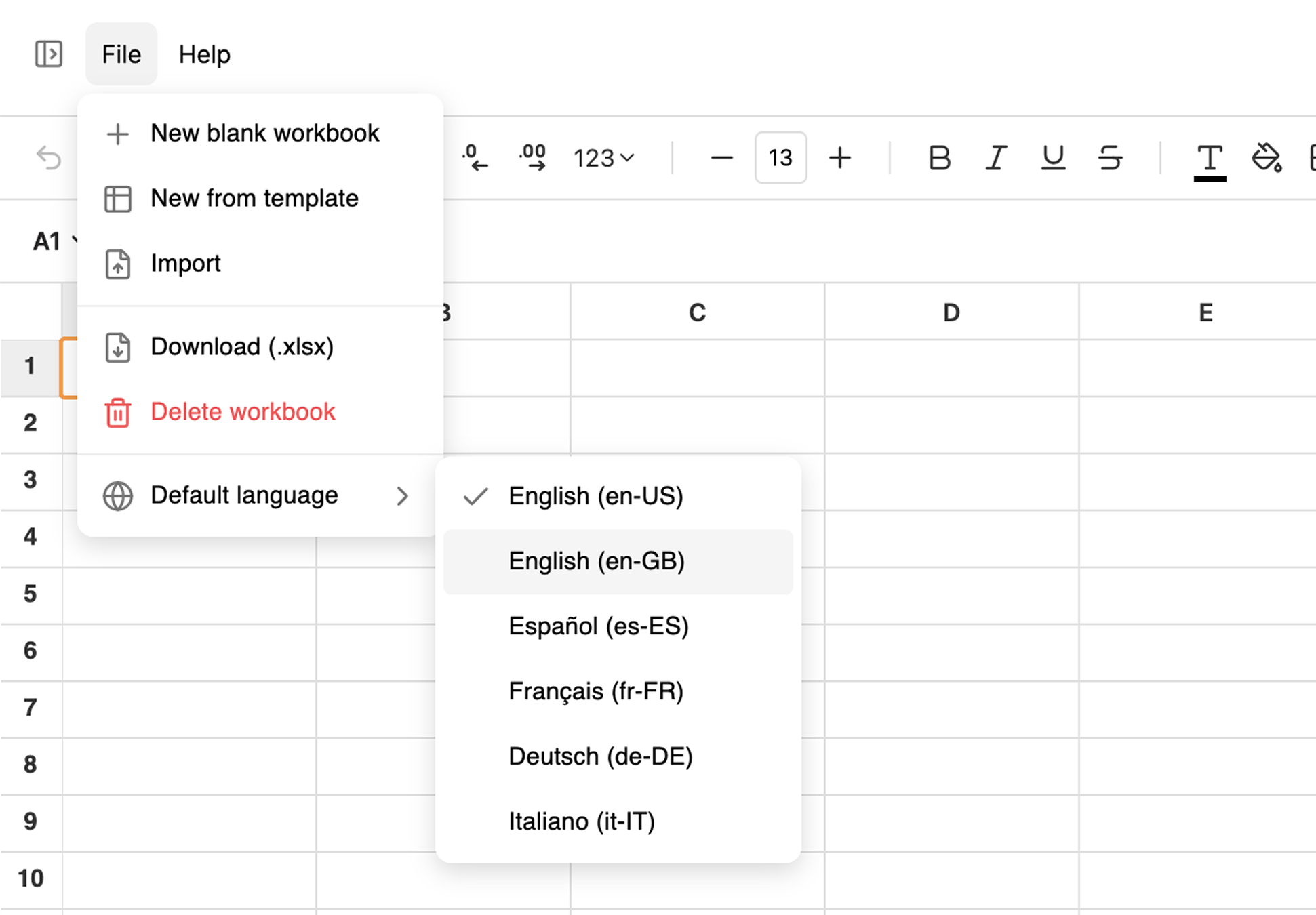
The language changes instantly. Any formulas you have will update to use the new language. The rest of the interface—menus, buttons, and tooltips will be translated as well.