

Managing Workbooks
All your workbooks can be accessed from the Workbook Sidebar. To open it, click the menu button in the top-left corner of the window.
How to Add a New Workbook
- Click the plus icon at the top of the sidebar.
- This will instantly create a new workbook. Workbooks are ordered by date (newest on top).
- You can also add a workbook from the File menu.
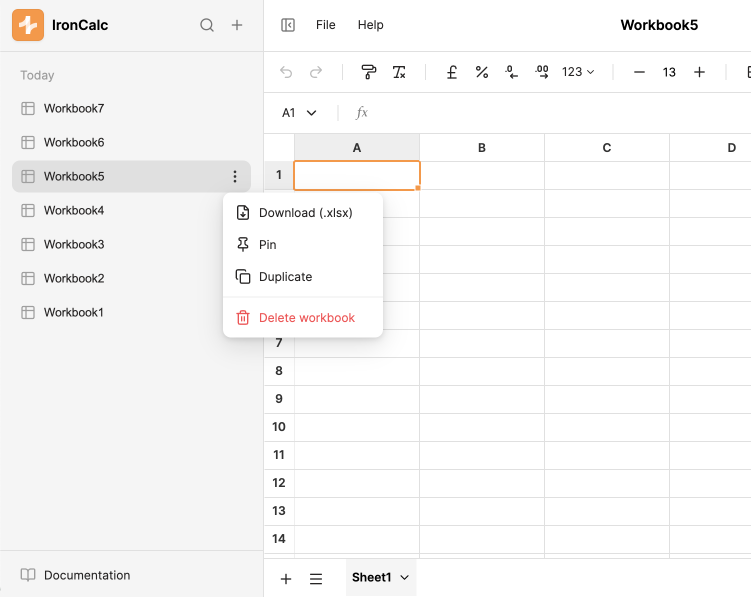
Workbooks can also be added by duplicating existing ones. Click the ellipsis button (⋯) next to the workbook name, then click Duplicate.
How to Delete a Workbook
- Click the ellipsis button (⋯) next to the workbook name, then click Delete.
- A confirmation dialog will appear. Click Accept to confirm deletion.
How to Delete Multiple Workbooks
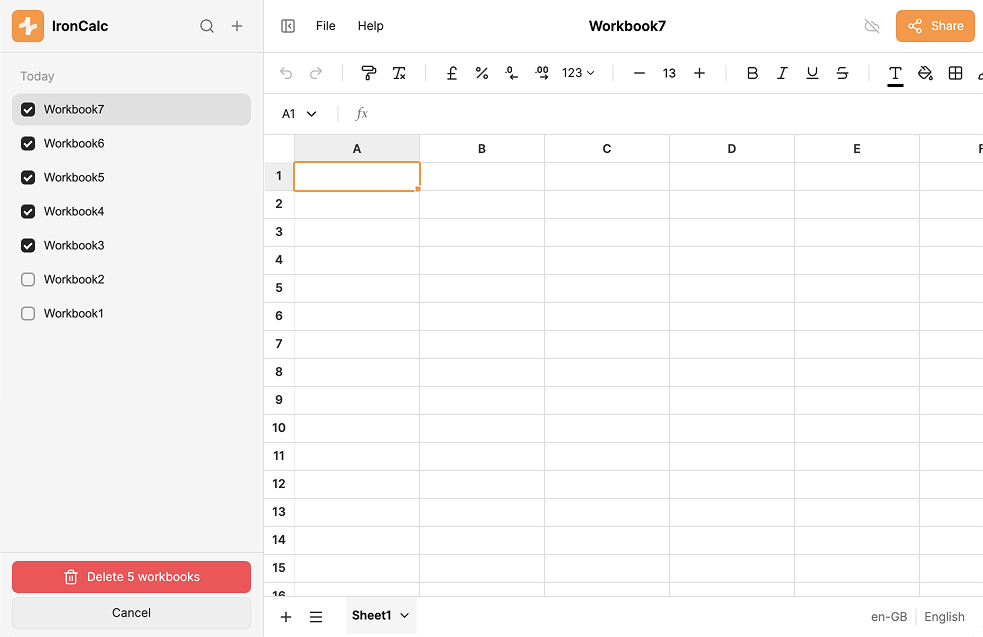
- Hover over the icon to the left of a workbook name. A checkbox will appear.
- Click the checkbox to select that workbook.
- Continue clicking checkboxes to add more workbooks to the selection. You can also hold Shift and click another checkbox to quickly select a range of workbooks.
- Click Delete Workbooks to delete all selected workbooks.
How to Search for a Workbook
If you can't find a workbook in the list, use the search bar in the sidebar header to filter workbooks by name.
How to Pin a Workbook
- Click the ellipsis button (⋯) next to the workbook name, then click Pin.
Pinned workbooks appear at the top of the sidebar, even above newly created workbooks. To unpin, click the ellipsis button again and select Unpin.